Pulse surveys seem straightforward — write a few questions, send them out, review the data. But results vary widely based on cadence, question design, anonymity controls, and whether feedback actually leads to visible change. In remote settings, where trust is harder to establish, those variables matter even more.
This guide covers the exact steps to set up a remote pulse survey program, the variables that affect data quality, and the mistakes that quietly kill participation over time.
Key Takeaways
- Remote pulse surveys replace the informal check-ins that happen naturally in offices — they're structural, not supplemental
- Anonymity drives honest responses — platforms that can't guarantee it produce filtered, defensive data
- Survey cadence must match your capacity to act — surveying faster than you can respond accelerates disengagement
- Question count and mobile accessibility directly affect completion rates and response quality
- Closing the feedback loop visibly is what sustains participation over time
Why Remote Teams Need Pulse Surveys More Than Ever
Remote work removes the ambient feedback loop that offices create naturally. There's no reading the room in a hallway, no noticing when someone seems off at their desk. For managers, this creates a genuine visibility gap — one that gets wider the more distributed the team is.
The risks aren't hypothetical. Gallup's research on the remote work paradox found that fully remote employees can show higher engagement scores while simultaneously experiencing more isolation, stress, and emotional strain than their in-office counterparts. High engagement metrics masking real distress is precisely the pattern that well-designed pulse surveys are built to catch.
Remote workers also face specific challenges that make them less likely to speak up on their own:
- Reduced social connection and fewer informal touchpoints leave employees feeling cut off from their teams
- Proximity bias means remote employees are more likely to be overlooked when leaders rely on physical presence cues
- Asynchronous delays and unclear priorities create confusion that rarely gets flagged directly
- Difficulty separating work from personal time is a persistent complaint among remote workers
Each of these issues is documented. Eurofound identifies long working hours, isolation, and inadequate equipment as concrete telework risks — and without a structured channel for employees to report them, they go undetected until they become bigger problems.
Gallup reports that 80% of employees who received meaningful feedback in the past week are fully engaged — a strong argument for frequent, lightweight check-ins rather than annual surveys.
How to Set Up Employee Pulse Surveys for Remote Teams
Step 1: Define Your Objective and Survey Cadence
Before writing a single question, clarify what decision this survey needs to support. A survey designed to identify burnout risk looks very different from one measuring clarity after a reorg announcement. Without a defined objective, questions become too broad to act on — and employees quickly sense when a survey is a checkbox exercise rather than genuine listening.
Choose cadence based on objective and your team's realistic action capacity:
| Cadence | Question Count | Best For |
|---|---|---|
| Weekly | 1–3 questions | Fast temperature checks, crisis response, onboarding |
| Monthly | 5–8 questions | Ongoing engagement monitoring, morale tracking |
| Quarterly | Up to 10 questions | Broader culture themes, lower-action-capacity teams |
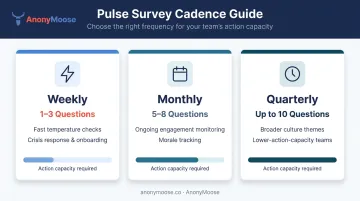
Remote teams generally benefit from more frequent, lighter check-ins than office-based teams — but only if someone is positioned to act on the results.
Define two owners upfront: who designs and launches the survey, and who reviews results and drives visible follow-up. Without that split accountability, pulse surveys stall.
Step 2: Design Questions That Capture Remote-Specific Realities
Structure your survey around a core set of 3–5 questions asked every cycle (to track trends) plus 1–2 rotating questions tied to current priorities or concerns.
Remote-specific topics to cover in your core set:
- Workload manageability and work-life boundary clarity
- Clarity of priorities and manager communication
- Sense of connection and belonging to the team
- Access to the tools and resources needed to do the job
- Psychological safety to raise concerns
For question formats, keep it simple:
- Likert scale for trend tracking (e.g., "On a scale of 1–5, how clear are your priorities this week?")
- One eNPS question for benchmarking
- One open-ended question maximum per survey (more than that kills completion rates on mobile)
Avoid compound questions ("Do you feel connected to your team and have the tools you need?") and anything that could mean different things across time zones or contexts.
Step 3: Choose the Right Tool — Prioritize Anonymity and Mobile Accessibility
Two platform requirements are non-negotiable for remote teams: genuine anonymity and **frictionless mobile access**.
On anonymity: partial anonymity isn't enough. Employees who can't verify their responses are truly unidentifiable will self-censor, particularly on sensitive topics like manager effectiveness or mental health. The platform needs to guarantee that neither the employer nor the platform itself can trace a response to a specific person. That's a design requirement, not a policy promise.
On access: remote and hybrid workers complete surveys on personal devices, outside working hours, often while doing something else. Any friction at the access point (app download barriers, multi-step logins, email-only delivery) reduces completion rates.
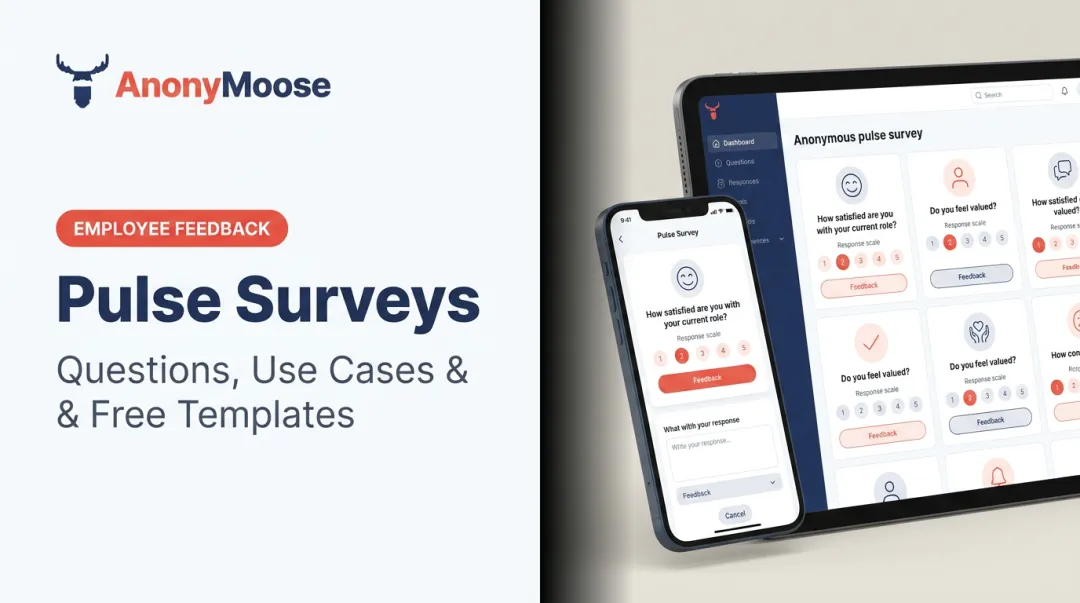
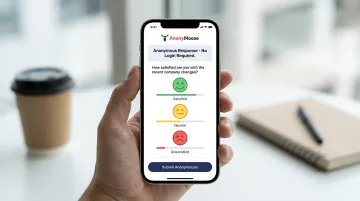
AnonyMoose's Polls & Surveys feature is built specifically for these conditions. Its anonymity is architectural: no technical mechanism exists within the platform to trace a response to an individual. That's what separates it from tools that promise confidentiality but retain re-identification capability at the HR analytics layer.
The platform delivers survey requests via push notification to employees' phones, requires no company email, and works on personal devices anywhere in the world. For teams where trust in the feedback process is still being built, that design matters.
Step 4: Launch With Context and Drive Participation
Remote employees won't prioritize a survey they don't understand the purpose of. Send a short launch message (through email, Slack, Teams, or whatever channel the team actually uses) that answers three questions:
- Why is this survey being run?
- How long will it take?
- What happens with the results?
Plan a structured reminder cadence: launch on Day 1, reminder on Day 3–4, final nudge in the last 48 hours before close. Who sends the survey matters too : for team-specific topics, a message from the direct manager or team lead outperforms a centralized HR broadcast.
Respect time zones. Schedule launches during overlapping working hours where possible, and keep the participation window open long enough that employees in different regions can respond without feeling rushed.
Step 5: Analyze Results and Close the Feedback Loop Visibly
Before interpreting scores, validate participation. A healthy overall response rate can mask entire teams or departments that didn't engage : check whether key groups (departments, tenure bands, time zones) are represented before drawing conclusions.
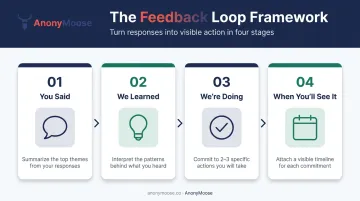
To communicate results back to the team, use this framework:
You said / We learned / We're doing / When you'll see it
Summarize the top themes, interpret the patterns, commit to 2–3 specific actions tied directly to the feedback, and attach a timeline.
For remote teams, how results are shared matters as much as what's shared. Use asynchronous formats (written digest, recorded video summary, team messaging) so no employee is excluded by time zone or schedule. Remote employees only know something changed if someone tells them explicitly. Visible follow-through isn't best practice; it's the primary mechanism for building trust in the process.
Key Variables That Affect Remote Pulse Survey Quality
Even a well-designed survey produces unreliable data if these variables are poorly managed.
Anonymity Design
The degree to which employees trust anonymity — not just whether it's promised — determines how candid their responses are. A DecisionWise benchmark of more than 100,000 U.S. employees found that 34% don't speak up due to fear of retribution. Remote employees, who lack informal ways to assess organizational safety, are more risk-averse about written feedback than in-office peers.
Platforms that offer "optional anonymity" or segment results so narrowly that individuals can be inferred create the same self-censorship problem as identified surveys. When evaluating platforms, check whether small team sizes or demographic filters could make individual responses identifiable — that's where trust breaks down.
Question Count and Completion Time
Qualtrics' survey methodology guidance identifies that surveys exceeding 9 minutes on mobile see substantial respondent drop-off. For remote pulse surveys, the practical target is well under that — aim for under 5 minutes.
Longer surveys don't just reduce completion rates; they reduce response quality. Employees who reach question eight on a ten-question survey on their phone at 7 PM will start giving low-effort answers, skewing your data.
Cadence vs. Action Capacity
Survey fatigue isn't caused by asking too many questions — it's caused by asking questions and doing nothing with the answers. Gallup is direct: if leaders survey without acting on results, employee engagement decreases and turnover increases.
Running surveys more frequently than your team can act on creates "lack-of-action fatigue." In remote environments, where visible organizational change is harder to observe, this effect compounds faster. Before adding a new survey cycle, ask whether the last round produced a visible response.

Follow-Through Visibility
In offices, employees pick up on change informally — new processes, different behaviors, updated norms. Remote employees see none of that unless it's explicitly communicated. Surveys with no shared results or visible action within 2–4 weeks will see declining participation in subsequent cycles.
Closing the loop — sharing what you heard and what you're doing about it — is what keeps participation rates from eroding over time.
Common Mistakes When Running Pulse Surveys for Remote Teams
Most pulse survey programs fail for the same handful of reasons. Here's what to avoid:
Skipping objective-setting and using a generic template. Without a defined purpose, questions cover too much ground to be actionable. Employees notice when surveys aren't connected to anything real — and they respond accordingly, or don't.
Launching surveys before you have an action rhythm. Running weekly pulses before your team has a process for reviewing results and communicating changes accelerates disengagement. In remote teams, where skepticism about visibility runs higher, this mistake hits faster and harder.
Promising anonymity you can't actually deliver. If surveys are distributed through channels that log responses against employee accounts — or if results are segmented so narrowly that individuals can be inferred — trust collapses. Future surveys yield filtered, defensive responses. That's worse than no data at all, because the results look real but aren't.
Treating results as an internal HR report. In remote environments, findings that are never shared back create an information vacuum that breeds speculation. Communicating results — even unflattering ones — is what gives the program enough credibility to sustain participation over time.
Frequently Asked Questions
How do you create a pulse survey?
Start by defining a clear objective, then write 3–10 short, measurable questions tied to that objective. Choose a distribution platform with genuine anonymity controls, and plan how and when results will be communicated back to employees before you launch.
Are employee pulse surveys really anonymous?
Anonymity varies by platform. Some tools offer only partial anonymity or segment results in ways that can expose individuals. Genuinely anonymous platforms (like AnonyMoose) are architecturally designed so neither the employer nor the platform can trace a response to a specific person.
Is a pulse survey mandatory?
Typically no, and making participation mandatory tends to reduce response quality through low-effort answering. Organizations get better data when employees understand the purpose, trust that responses are truly anonymous, and believe their feedback leads to visible change.
How often should pulse surveys be sent to remote employees?
Match cadence to your objective:
- Weekly (1–3 questions): fast temperature checks
- Monthly (5–8 questions): engagement monitoring
- Quarterly: broader cultural or strategic themes
Never run surveys more frequently than your team can act on and communicate results.
What questions should I ask in a remote team pulse survey?
Strong remote pulse surveys cover:
- Workload and work-life balance
- Clarity of priorities and manager communication
- Sense of connection and belonging
- Access to tools and resources
- Psychological safety to raise concerns
Limit open-ended questions to one per survey maximum.
How do you get better response rates from remote employees?
Five practices that consistently improve response rates:
- Keep surveys under 5 minutes
- Use a mobile-accessible platform with guaranteed anonymity
- Explain the purpose clearly in the launch message
- Run a structured reminder cadence
- Share results consistently so employees see participation leads to real change
Conclusion
Setting up a pulse survey for a remote team isn't just a technical task. It requires a clear objective, genuine anonymity, accessible delivery, and a feedback loop that proves to employees their input shapes decisions.
Most remote pulse survey failures trace back to two root causes: poor preparation — no defined objective or ownership — or poor follow-through — results that disappear without visible action. Both undermine participation faster than any question design flaw.
When those failure modes are addressed, remote pulse surveys become the most practical substitute for the informal listening that happens naturally in physical offices. They won't replace good management — but they give distributed teams a structured channel to surface what would otherwise go unheard, and that's where real engagement starts.