Introduction
Most teams in 2026 aren't suffering from a lack of communication tools — they're drowning in too many disconnected ones. According to Asana's research, the average worker switches between 9 apps per day just to get work done. The result: fragmented updates, missed messages, and employees who feel increasingly disconnected from the organization.
Poor communication has a measurable cost. Grammarly's 2023 State of Business Communication report found that miscommunication costs US businesses $12,506 per employee per year. And the consequences extend beyond day-to-day efficiency: according to Axios HQ (based on LinkedIn studies), 42% of employees have left an organization due to poor internal communication — making communication infrastructure a direct retention factor, not just a productivity one. That's a systems problem, and the right tools can close most of that gap.
The right internal communication stack goes well beyond messaging. It spans real-time collaboration, broadcast updates, knowledge management, and safe channels where employees can speak honestly without fear of retaliation. This guide covers 10 tools across all of these categories, selected to give teams a complete picture of what's available in 2026.
Key Takeaways
- Poor internal communication costs US businesses over $12,500 per employee annually
- Effective stacks cover four categories: messaging, broadcast/email, knowledge management, and employee feedback
- Most organizations need 2–4 complementary tools — no single platform covers every need
- Anonymous feedback channels are the most overlooked layer in most communication stacks — and the one employees value most
- Tools that protect employee identity drive higher response rates and more honest input
What Is Internal Communication Software?
Internal communication software refers to platforms built specifically to help organizations inform, align, and engage employees — across departments, locations, and job types. Unlike standard email clients or external marketing tools, these platforms include the security controls, audience targeting, and engagement analytics that internal communication actually requires.
Gartner frames these platforms as tools that improve communication efficiency through targeted messaging and detailed reporting on employee engagement.
There are four core categories:
- Real-time messaging — chat, channels, and video for day-to-day collaboration (Slack, Teams)
- Broadcast and email platforms — structured, measurable communications from leadership to employees (ContactMonkey, Workshop)
- Intranet and knowledge hubs — searchable documentation and company knowledge (Confluence, Staffbase)
- Employee feedback and listening tools — structured channels for employees to communicate upward, anonymously or otherwise (AnonyMoose)
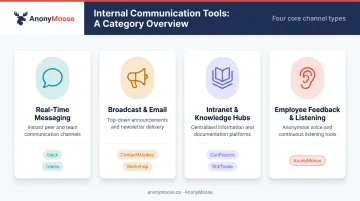
The sections below cover the 10 best tools for 2026, drawing from each category.
10 Best Internal Communication Tools for Teams in 2026
Tools were evaluated on reliability, feature depth within their category, ease of adoption for lean teams, integration capability, and pricing accessibility.
Slack
Slack is a real-time messaging platform built around channels, direct messages, and workflow automation. Owned by Salesforce and used by organizations of all sizes, it's the default for teams that want fast, informal day-to-day collaboration.
What makes it stand out: Channel-based organization keeps project and department conversations separate. Workflow Builder automates routine notifications. Slack AI summarizes long threads and surfaces relevant search results. Huddles provide lightweight audio and video without leaving the platform.
| Category | Details |
|---|---|
| Best For | Real-time team messaging and day-to-day collaboration |
| Key Features | Channels, threads, DMs, Huddles, Workflow Builder, Slack AI, 2,600+ integrations |
| Pricing | Free plan available; paid plans start at $8.75/user/month |
Microsoft Teams
Microsoft Teams is a collaboration hub embedded inside the Microsoft 365 ecosystem, combining chat, video conferencing, file sharing, and app integrations. It's dominant in enterprise environments where Microsoft tools are already standardized.
What makes it stand out: Native integration with SharePoint, OneDrive, and Outlook means employees don't need to leave their existing workflow. Microsoft Copilot generates meeting summaries and tracks follow-up tasks automatically. Teams also supports large-scale webinars and broadcasts, making it viable beyond just day-to-day chat.
| Category | Details |
|---|---|
| Best For | Enterprises using Microsoft 365 for communication and collaboration |
| Key Features | Chat, video meetings, file sharing, SharePoint and Outlook integration, Copilot AI |
| Pricing | Included in Microsoft 365 plans; standalone plans available from $4/user/month |
Google Workspace
Google Workspace brings Gmail, Google Chat, Meet, Docs, Sheets, Drive, and Spaces into one environment. It's widely used by remote-first and distributed teams that want communication and document collaboration on a single platform.
What makes it stand out: Seamless movement between chat, email, video, and live document editing without switching tools. Google Gemini handles meeting notes, email drafting, and summarizing unread channel activity. For teams already in the Google ecosystem, the integration overhead is essentially zero.
| Category | Details |
|---|---|
| Best For | Teams needing unified email, chat, video, and document collaboration |
| Key Features | Gmail, Google Chat, Meet, Drive, Docs, Spaces, Gemini AI |
| Pricing | Plans start from $6/user/month; no perpetually free business plan |
AnonyMoose
AnonyMoose is a SaaS platform purpose-built for anonymous employee communication and active listening. It fills a gap that every other tool on this list leaves open: a genuinely safe channel for employees to speak honestly, report incidents, and participate in surveys without any fear of identification.
What makes it stand out: Neither AnonyMoose nor the employer organization can identify individual submission authors. Employee data is encrypted at all times, and because submissions are stored without individual identifiers, anonymity is built into the architecture — not just stated in a policy.
Research published by SHRM shows 85% of employees feel more engaged when leaders communicate transparently — and that starts with employees feeling safe enough to be honest. Research from Axios HQ, based on LinkedIn studies, makes the communication stakes concrete: 42% of employees have left an organization due to poor internal communication — a turnover cost that anonymous feedback channels, when properly resourced, are specifically designed to prevent by surfacing the disconnects that named channels miss.
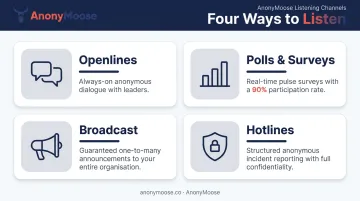
AnonyMoose offers four distinct listening channels:
- Openlines — Always-on, anonymous two-way channels between employees and specific leaders or departments. Replaces walk-ins, one-on-ones, town halls, and open-door policies without the scheduling overhead or psychological barriers those formats carry.
- Polls & Surveys — Real-time employee pulsing via push notification. Employees respond with a single tap. Anonymous surveys achieve 90% participation rates versus 30% for identified surveys, according to research from buildempire.co.uk, while also generating 58% more honest feedback than non-anonymous alternatives.
- Broadcast — Instant one-to-many messaging for leadership announcements, safety alerts, compliance updates, and mandatory notifications. Guaranteed delivery to every employee's phone regardless of location or desk access.
- Hotlines — Secure, structured incident reporting for harassment, ethical violations, discrimination, safety issues, and compliance concerns. Employees type from anywhere, in real time, with persistent conversation threads that allow follow-up and document attachment — removing every barrier that makes traditional phone hotlines chronically underused.
The platform also includes an Insights Dashboard for HR and leadership teams that surfaces aggregated analytics, trend data, and AI-powered pattern analysis across reported incidents — without ever exposing individual identities. Setup typically takes 2–4 weeks with employee data uploaded from any HRMS as a simple spreadsheet.
For organizations where employees have turned to Glassdoor or Blind to voice concerns, AnonyMoose addresses the root cause: when a credible, structurally anonymous internal channel exists, employees don't need external platforms to be heard.
| Category | Details |
|---|---|
| Best For | Anonymous employee feedback, psychological safety, DEI, and internal incident reporting |
| Key Features | Openlines, Polls & Surveys, Broadcast, Hotlines; guaranteed anonymity; mobile-first SaaS; Insights Dashboard; zero hardware cost |
| Pricing | SaaS subscription model; contact AnonyMoose at anonymoose.co for pricing |
ContactMonkey
ContactMonkey is a purpose-built internal email platform that integrates natively with Outlook and Gmail. Internal communications teams use it to design, send, measure, and act on employee email campaigns without leaving their existing inbox.
What makes it stand out: Analytics go beyond open rates — ContactMonkey surfaces read time, click maps, and department-level engagement breakdowns. CoAuthor AI assists with email drafting; ConfidenceCheck reviews quality before sending. Embedded pulse surveys and eNPS tools turn email into a two-way channel.
| Category | Details |
|---|---|
| Best For | Internal comms teams running measurable, branded employee email campaigns |
| Key Features | Outlook/Gmail integration, read time analytics, click maps, AI email builder, pulse surveys, HRIS integration, audience segmentation |
| Pricing | Quote-based; contact ContactMonkey for pricing |
Workshop
Workshop is an email-first internal communications platform with a drag-and-drop builder, AI-assisted writing via its Cici AI agent, audience segmentation, and one-click cross-posting to Slack, Teams, and SharePoint.
What makes it stand out: Cici AI generates complete, send-ready email drafts from a single text prompt — significantly faster than traditional email builders. Most teams go live within 2–4 weeks. Workshop holds a 4.7-star rating on G2 and earned the #1 ranking in internal communications categories in Summer 2026. Dedicated account management is included at no extra cost.
| Category | Details |
|---|---|
| Best For | Comms teams wanting fast, AI-assisted email creation and multi-channel distribution |
| Key Features | Drag-and-drop editor, Cici AI agent, SMS, cross-post to Teams/Slack/SharePoint, analytics, HRIS integrations, Canva integration |
| Pricing | Starts at $250/month |
Staffbase
Staffbase is an enterprise employee experience platform specializing in branded intranets, employee apps, and multi-channel communications. It's particularly strong in industries with large frontline or deskless workforces — manufacturing, healthcare, and retail.
What makes it stand out: Fully branded intranet and employee app under one vendor. Supports email, digital signage, and SMS alongside the intranet, giving large enterprises one platform for all broadcast channels. Deep Microsoft 365 integration and built-in content analytics make it a strong fit for IT-led consolidation projects.
| Category | Details |
|---|---|
| Best For | Large enterprises building a branded intranet and omnichannel employee experience |
| Key Features | Branded intranet, employee app, email designer, digital signage, content analytics, Microsoft 365 integration |
| Pricing | Quote-based enterprise pricing |
Connecteam
Connecteam is an employee management platform combining mobile messaging, scheduling, time tracking, onboarding, and a centralized knowledge base — built specifically for frontline, deskless, and field-based teams.
What makes it stand out: The knowledge base feature lets teams upload and track engagement with policies, training materials, and onboarding content. An employee directory stores vendor, supplier, and colleague contacts in one app. Affordable pricing makes it accessible for small to mid-sized organizations managing hourly or shift-based workers.
| Category | Details |
|---|---|
| Best For | Frontline and deskless teams needing mobile communication and a centralized knowledge base |
| Key Features | Chat, knowledge base, employee directory, scheduling, time tracking, surveys and polls, mobile app |
| Pricing | Free plan for up to 10 users; paid plans start at $35/month for the first 30 users |

Loom
Loom is an asynchronous video messaging platform that lets teams record and share screen-plus-webcam videos instantly — reducing meeting overload while giving distributed teams the visual context that text alone can't provide.
What makes it stand out: One-click recording captures screen and webcam simultaneously. Loom AI removes filler words and automatically generates video titles, summaries, and chapters. Videos share via link, embed in intranets, or attach to emails. For hybrid and remote teams, it's a practical alternative to a meeting that didn't need to happen.
| Category | Details |
|---|---|
| Best For | Async video updates, feedback, and reducing unnecessary meetings for hybrid or remote teams |
| Key Features | Screen and webcam recording, Loom AI summaries, viewer reactions and comments, shareable links, Chrome extension, mobile app |
| Pricing | Free plan available; Business plan starts at $12.50/user/month, billed annually |
Confluence
Confluence by Atlassian is a wiki-style knowledge management and team collaboration platform for creating, organizing, and searching documentation, project resources, and institutional knowledge. It's particularly effective for technical and cross-functional teams.
What makes it stand out: Unlimited pages and spaces with robust version history. Whiteboard and diagram tools support brainstorming alongside written documentation. An AI editor improves content quality in-platform. Deep Jira integration makes it natural for teams already using Atlassian's project management suite.
| Category | Details |
|---|---|
| Best For | Centralized knowledge management and cross-team documentation |
| Key Features | Wiki pages, whiteboards, templates, AI editor, Jira integration, search, access controls, version history |
| Pricing | Free plan available; Standard plan starts at approximately $5.42/user/month |
How We Chose the Best Internal Communication Tools
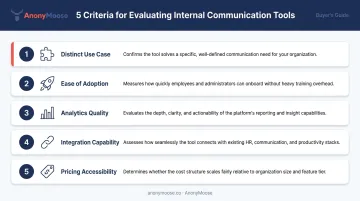
Tools were selected based on five criteria:
- Distinct use case — each tool had to serve a clearly defined communication need that others couldn't fully replace
- Ease of adoption — prioritized tools lean teams can implement without months of IT involvement
- Analytics quality — tools with actionable reporting ranked higher than those with surface-level metrics
- Integration capability — how well each tool fits into an existing workplace stack
- Pricing accessibility — solutions available across company sizes, not just enterprise budgets
One mistake shows up repeatedly in organizations that evaluate communication tools: they default to familiar platforms — usually email and Slack — while overlooking specialized tools that address the listening side of internal communications. The practical consequence is employees who feel unheard and eventually turn to Glassdoor or Blind to say what they couldn't say internally.
According to a 2024 Corporate Compliance Insights roundup, 43% of workers fear retaliation if they speak up. Slack channels and email newsletters don't solve that — employees need a dedicated listening channel where anonymity isn't just promised but structurally guaranteed.
That's why the strongest internal communication stacks combine tools across categories rather than relying on one platform to do everything:
- At least one real-time messaging tool for daily collaboration
- One broadcast or email platform for structured organizational communications
- One knowledge hub for searchable, persistent documentation
- One feedback and listening channel for employees to communicate upward safely
Miss any one of these, and you'll have gaps — either in information flow, visibility, or the employee trust that keeps people engaged long-term.
Conclusion
Effective internal communication in 2026 means covering the full spectrum — from real-time chat and structured broadcast to searchable knowledge management and anonymous employee listening. Relying on any single platform leaves gaps that steadily undermine alignment, engagement, and trust over time.
Before adding or removing tools from your stack, audit what you currently have. These questions cut through the noise:
- Can employees communicate upward safely and without fear of identification?
- Are feedback channels genuinely confidential — or just labeled that way?
- Are engagement metrics tracked beyond open rates?
- Do frontline and deskless employees have the same access as desk workers?
For organizations where psychological safety, DEI, and employee voice are priorities, a dedicated anonymous communication platform is essential — because even the best broadcast infrastructure can't surface what employees actually think if they don't feel safe saying it.
AnonyMoose addresses exactly that need — with anonymous Openlines, Polls & Surveys, Broadcast messaging, and Hotlines that give employees a genuinely safe channel to speak up. Visit anonymoose.co or contact info@anonymoose.co to see how it fits your stack.
Frequently Asked Questions
What is internal communication software?
Internal communication software covers platforms built to help organizations share information, align employees, and collaborate across teams and locations. Unlike external marketing tools, these platforms include employee-specific reach, security controls, and engagement analytics.
What is the best internal communication software?
The right choice depends on team size, workforce type, and your primary communication gaps. For day-to-day messaging, Slack leads. For structured internal email, ContactMonkey and Workshop are strong options. For anonymous employee feedback and psychological safety, AnonyMoose is purpose-built for that need.
What are examples of internal communication software?
Examples span several categories:
- Real-time messaging: Slack, Microsoft Teams
- Internal email: ContactMonkey, Workshop
- Intranet & knowledge management: Staffbase, Confluence
- Async video: Loom
- Anonymous feedback & incident reporting: AnonyMoose
What are the four types of internal communication?
The four types are top-down communication (leadership to employees), bottom-up communication (employees to leadership), peer-to-peer communication (between colleagues), and crisis or emergency communication. Most tools specialize in one or two — anonymous feedback tools like AnonyMoose specifically enable bottom-up communication without fear of retaliation.
How do I choose the right internal communication tool for my team?
Start by identifying your team's most pressing communication gap — fragmented information, low email engagement, remote reach, or lack of safe feedback channels. Then select tools that directly solve those specific problems rather than defaulting to what's most familiar. A well-chosen stack covers all four communication directions, so no employees are left without a reliable, safe channel.