Introduction
Picture a busy Friday dinner rush: the morning prep crew is long gone, the floor staff just clocked in, and the closing team won't show until 4pm. Nobody shares an inbox. Pre-shift briefings get swallowed by kitchen noise. A missed update about an 86'd menu item or a surprise health inspection can cascade into a service failure within minutes.
The stakes are real. BLS data from April 2026 recorded 805,000 separations in accommodation and food services in a single month — a 5.6% monthly separation rate. Meanwhile, Gallup research shows that highly engaged teams have 21% less turnover in high-turnover industries. The right communication software reduces scheduling chaos and, over time, keeps more of your team from walking out the door.
This guide covers the best restaurant communication software for employee coordination, what each tool does well, and how to choose the right stack for your operation.
Key Takeaways
- Restaurant communication software must work on mobile without a corporate email — most floor and kitchen staff never touch a desk
- The strongest setups pair an operational coordination tool for scheduling and tasks with a separate employee voice tool for feedback and surveys
- 7shifts and Connecteam handle day-to-day coordination; Blink and Slack serve different team layers
- AnonyMoose fills the gap operational tools leave: fully untraceable anonymous feedback for staff who fear retaliation
- Pricing ranges from free tiers to enterprise contracts; match the tool to your location count and team size
Why Restaurant Teams Need Dedicated Communication Software
Restaurant communication software covers real-time coordination, shift updates, policy broadcasts, and employee feedback across a workforce that is largely deskless, multilingual, and shift-based.
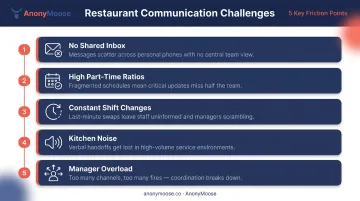
Generic office tools aren't built for how restaurants actually operate. The gap shows up in predictable places:
- No shared inbox. Most floor and kitchen staff don't have company email addresses.
- High part-time ratios. Staff may work two or three shifts a week across different managers.
- Constant shift changes. A schedule update sent via group text is easily missed or ignored.
- Kitchen noise. Verbal briefings are unreliable when equipment is running.
- Manager overload. Restaurant managers handle operations, staffing, and customer issues simultaneously — chasing down every staff member individually isn't realistic.
Deloitte found that only 23% of frontline workers believe they have the tools necessary to be productive. Dedicated restaurant communication tools exist precisely because that number stays low when teams rely on email threads and group texts.
The tools below were selected for restaurant team structures specifically — not generic enterprise use cases. They cover different coordination needs, from scheduling communications to anonymous incident reporting.
Best Restaurant Communication Software for Employee Coordination
Tools were evaluated on mobile accessibility, ease of adoption for non-tech staff, restaurant-specific features, pricing transparency, and support for two-way communication across all shifts.
7shifts
7shifts is a scheduling and team communication platform built specifically for restaurants, used by 55,000+ restaurants and 1.5M+ restaurant professionals. It combines shift scheduling, manager logbooks, task lists, and team messaging in a single app.
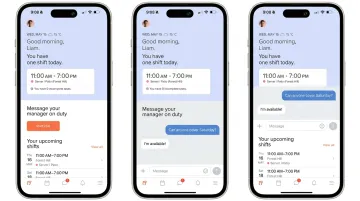
Where it earns its place: when a shift changes, 7shifts notifies the relevant staff instantly without requiring a phone tree. Managers can log daily sales, guest feedback, 86 items, and repair notes in the Manager Log Book — creating continuity across shifts without relying on memory or Post-it notes. Labor cost forecasting helps multi-unit operators control one of their largest expenses.
| Category | Details |
|---|---|
| Best For | Restaurant operators who want scheduling and team communication in one purpose-built platform |
| Key Features | Shift scheduling, team messaging, manager log, task checklists, labor cost forecasting, mobile-first app |
| Pricing | Free plan available. Paid tiers start from the Complete plan at ~$149.99/month per location (pricing updated July 2025 — confirm current tiers at 7shifts.com/pricing) |
Connecteam
Connecteam is a mobile-first employee management platform designed for deskless and frontline workforces, widely used across hospitality, retail, and food service. Its strength is combining scheduling, task management, and team communication with enough flexibility to handle multi-location franchise structures.
For restaurants specifically, managers can assign shift-specific checklists — opening procedures, temperature logs, cleaning tasks — so pre-shift briefings become shorter or unnecessary. Push notifications reach floor staff in real time. The platform has a dedicated Food and Beverage setup guide for operations-hub workflows.
| Category | Details |
|---|---|
| Best For | Multi-location restaurants and franchises needing operations management, scheduling, and communication in one app |
| Key Features | Push notifications, group and direct chat, digital checklists, shift scheduling, forms, surveys, knowledge base |
| Pricing | Free for up to 10 users (Small Business Plan). Communications Hub starts at $29/month for the first 30 users (billed annually), plus $0.50/month per additional user. Full details at connecteam.com/pricing |
Blink
Blink gives restaurant chains a single branded hub to replace the fragmented WhatsApp threads and paper communications that most frontline teams rely on. McDonald's, Domino's, Shake Shack, and Chick-fil-A all use it to coordinate staff without company devices or email addresses.
The differentiator is targeting. Administrators can segment communications by role or location — so a city-wide chain's kitchen team gets different updates than front-of-house staff. Blink reaches workers without email, desks, or company devices, using a social-feed interface that's familiar to staff without any training curve. For chains that want culture alongside coordination, Blink also includes recognition features.
| Category | Details |
|---|---|
| Best For | Restaurant chains and franchise groups needing to reach frontline staff with segmented, culture-forward communications |
| Key Features | Social news feed, secure chat, digital forms, surveys, recognition, employee hub, analytics, live streaming |
| Pricing | Core: $3.75/user/month (billed annually) or $4.50/month. Pro: $5.00/user/month (billed annually) or $6.00/month. Enterprise: contact sales. Details at joinblink.com/pricing |
Slack
Slack works as a management-layer tool in restaurant contexts — not a frontline coordination platform. It works well for salaried managers, corporate ops teams, and back-office staff who need fast, organized channel-based communication across departments.
Practical channel structures for restaurant management: #health-safety, #schedule-changes, #vendor-issues, #marketing. Slack integrates with 2,600+ apps and has a workflow builder that can automate common requests. The limitation is real: floor and kitchen staff rarely use it, and Slack's free plan caps message history at 90 days — a meaningful constraint for compliance records.
| Category | Details |
|---|---|
| Best For | Restaurant management teams, corporate ops, and back-office staff who need organized channel-based messaging |
| Key Features | Channels, direct messaging, file sharing, app integrations (2,600+), workflow builder, searchable history |
| Pricing | Free plan available (90-day message history). Pro: $7.25/user/month (annual) or $8.75/month. Business+: $15/user/month (annual). Enterprise: contact sales. See slack.com/pricing |
AnonyMoose
No corporate email required. Employees download the app on personal phones and authenticate via an HRMS upload — no company device, no IT setup. The platform deploys in 2–4 weeks.
Neither the employer nor AnonyMoose itself can trace a submission to an individual. That's the only guarantee that actually changes behavior.
| Category | Details |
|---|---|
| Best For | Restaurant groups focused on reducing turnover, collecting honest employee feedback, and preventing external complaints or regulatory exposure |
| Key Features | Anonymous Openlines, Polls & Surveys, Broadcast, Hotlines, mobile-first SaaS, encrypted data, no identity tracking, multi-language support |
| Pricing | Subscription-based SaaS scaled to organization size. Zero hardware investment. Contact info@anonymoose.co or visit anonymoose.co for a quote |
How We Chose the Best Restaurant Communication Software
The most common mistake restaurant buyers make is choosing enterprise platforms built for desk workers — tools that require IT setup, corporate email, or lengthy onboarding that frontline staff simply won't complete.
Evaluation criteria used:
- Mobile-first design with no-email onboarding for frontline staff
- Scheduling and real-time messaging integration (or clear complementarity between tools)
- Pricing accessible to independent operators and multi-location chains alike
- Two-way communication — not just top-down broadcasting
- Feedback and anonymous reporting to capture honest employee sentiment
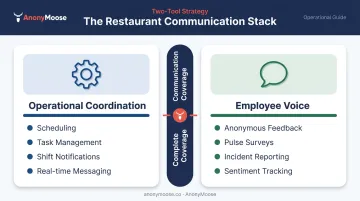
No single tool covers all restaurant communication needs equally. The most effective setups pair two tools — one for operational coordination (scheduling, task management, shift comms) and one for employee voice and engagement (anonymous feedback, pulse surveys).
Deloitte reports that 82% of frontline workers say better technology would improve productivity through better safety and communication. That stat reflects a real problem: most restaurants already know communication matters, but choose tools their staff won't adopt. Fitting the tool to how frontline workers actually work matters far more than feature counts.
Conclusion
The right communication software does two things for restaurants: it keeps teams operationally coordinated across shifts and locations, and it gives staff a real channel to be heard. The second part is where most operators overlook.
When choosing tools, match them to your actual structure. A 12-seat independent and a 200-location QSR chain have almost nothing in common operationally — their communication setups shouldn't look the same either. Consider single vs. multi-unit scale, franchise vs. independent ownership, and whether your team is FOH-heavy or BOH-heavy.
For restaurants that want to go beyond shift coordination and build a workplace where staff can safely raise concerns, AnonyMoose provides a zero-hardware, mobile-first solution that works alongside your existing scheduling and messaging tools. Visit anonymoose.co to see how anonymous feedback channels can lower turnover and surface problems before they escalate.
Frequently Asked Questions
What are the best internal communication tools for restaurants?
The top categories are mobile-first frontline apps (Blink, Connecteam), scheduling-integrated platforms (7shifts), team messaging for managers (Slack), and anonymous feedback tools (AnonyMoose). Restaurant and frontline workforces specifically need mobile-first tools — desktop-focused platforms like Microsoft Teams see poor adoption among floor and kitchen staff.
What software do most restaurants use?
7shifts is widely used for scheduling and shift communications, Connecteam for operational workflows across multiple locations, and Slack among management teams. Restaurant-specific platforms are gaining ground over general messaging apps like WhatsApp, which lack admin controls, analytics, and compliance features.
What should restaurants look for when switching from WhatsApp to a dedicated tool?
Look for admin controls (message history, user management), push notifications tied to shift schedules, and compliance-ready audit trails. WhatsApp lacks all three, which creates real risk as teams grow or locations multiply.
How do you improve employee communication in a restaurant?
Start with a mobile-first platform that works without corporate email. Standardize one official channel for announcements to replace informal WhatsApp threads. Then add an anonymous feedback layer so staff can raise concerns before they escalate into turnover or public complaints.
Can restaurant employees give anonymous feedback to management?
Yes. Purpose-built platforms like AnonyMoose let staff submit feedback, report concerns, or respond to surveys with no identity disclosure — not even to AnonyMoose itself. That technical guarantee is what drives actual adoption, rather than staff venting on Glassdoor instead.
What features should restaurant communication software have?
Core must-haves include mobile-first access without corporate email, push notifications for shift updates, group and direct messaging, scheduling integration, and pulse surveys. Add an anonymous reporting channel for complete coverage — most platforms skip this feature, and that gap is where turnover and compliance risks tend to build up.